

A homeowner comparing heat pump installers has different questions from someone with a leaking water heater. One wants to understand options before investing. The other needs to know who serves their town and how to reach them. In both situations, clear business information matters before your office ever answers the phone.
On November 10, 2026, OpenAI introduced Businesses in ChatGPT in beta. Its Business Hub gives eligible businesses a way to claim their business, contribute current information, and see aggregate engagement insights. Business Agents add a separate conversation experience for eligible businesses.
For plumbers, HVAC companies, roofers, electricians, remodelers, and landscapers, this is worth checking. The useful question is what your company can actually access today, and whether the information a prospective customer finds accurately describes the work you do.
Current as of November 11, 2026. This guide combines official launch documentation with practical recommendations for home service businesses. It does not report results from a contractor pilot or a firsthand test of the claim process.
Can a home service contractor claim a business in ChatGPT?
Check your specific business in Business Hub. OpenAI has not established universal eligibility for service-area contractors. Its setup guide says availability depends on location and business type; local stores and restaurants can currently claim only existing U.S. listings. An eligible online business may have an add-business option. A contractor website alone does not establish eligibility. Check the current setup guidance.
That uncertainty deserves a straightforward answer. A plumbing company that sends technicians to customers is not automatically an “online service business” because it accepts estimate requests online. A roofer should not select an inaccurate category just to get through a form. Use the options that describe the real company, and ask OpenAI Support about an unclear or unavailable claim path.
If your company has several branches, make a list of the actual locations and the people responsible for them before starting. Keep a record of which listing you selected and which account manages it. This is basic account housekeeping, but it prevents confusion when an office manager changes roles or an outside marketing partner takes over maintenance.
What is the practical benefit for contractors?
OpenAI describes the foundation of the launch as current business information, useful insights, and better ways to explore offerings. Those capabilities could help a contractor present its services more clearly. They do not establish that claiming will produce more calls. Read the launch announcement.
Think about the information your dispatcher repeats every week. Do you replace water heaters, or only repair them? Do you handle residential panel upgrades? Is your roofing team available for small repairs? Which towns are outside your normal service area? When those answers are easy to find, a homeowner can make a more informed decision about contacting you.
Here are useful applications to consider, rather than promised outcomes:
- Plumbers: distinguish drain cleaning, fixture repairs, water heater work, and emergency response. Explain whether after-hours calls reach dispatch or a callback queue.
- HVAC firms: separate installation, repairs, maintenance plans, and the equipment types you actually service. Do not leave an expired seasonal promotion looking current.
- Roofers: explain repair versus replacement work, supported roof materials, and how an inspection request works. Avoid implying that every leak can be diagnosed remotely.
- Electricians: describe residential or commercial scope, service upgrades, EV charger installation, and your estimate process. Keep credential claims specific and verifiable.
- Remodelers and landscapers: show project types, service boundaries, seasonal scheduling, and whether you accept small jobs. A clear project minimum can be more useful than a broad promise to do everything.
The potential advantage is a better informed first contact. A homeowner who understands your scope can ask a more useful question. Your team can spend less of that conversation correcting expectations. Whether those improvements happen should be measured in your own business.
How to check and claim your business
According to OpenAI’s setup guide:
- Sign in to ChatGPT on the web, open Business Hub, and search your business name.
- Select the correct listing and management account.
- Follow an offered verification method: phone, business email, domain, or Shopify.
- Wait for claim approval, then complete Persona identity verification. Persona approval is required to publish information updates and access insights. The blue check follows Persona approval, not claiming alone.
Have your business records and account access ready before you begin. Use an account the business can responsibly maintain. If an agency helps, agree on responsibilities and access arrangements rather than passing around personal passwords. Keep verification documents in the official verification flow.
Domain verification may involve a DNS record. Give the exact record to the person who manages your domain and ask them to add it carefully. Treat this as an administrative task with a named owner, not something to squeeze in between service calls without recording what changed.
If you hit a locked listing or an unclear eligibility message, document the issue and contact support. Keep a brief internal log: business name, listing selected, date submitted, current status, and next action. This makes follow-up easier without repeated submissions or conflicting attempts from several staff members.
Prepare the information before you edit the profile
OpenAI’s business profile policy requires accurate, current information, including service areas and offerings, and prohibits misleading claims about qualifications, prices, availability, and results. Only manage a business you own or are authorized to represent. Use photos and other material you have permission to publish.
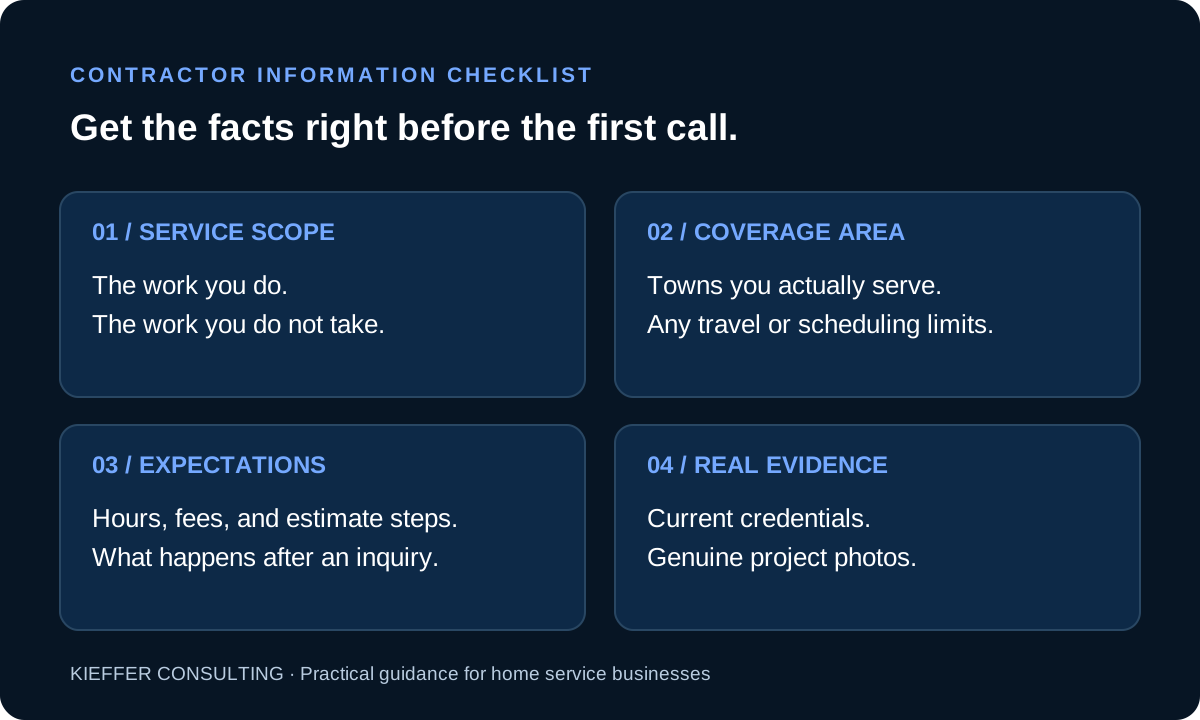
Start with a one-page internal reference your office can approve. Include your public business name, preferred website, customer-facing phone number, normal hours, services, exclusions, and service area. Note the date each detail was checked. Your profile, website, and front office should tell a consistent story.
Pay particular attention to emergency language. “We accept calls 24/7” and “a technician is available 24/7” can mean very different things. If you cannot promise a response time, do not suggest one. Likewise, distinguish a free estimate from a paid diagnostic visit, and explain conditions wherever a price or offer appears.
A strong contractor description can be plain: “We provide residential heating repairs and replacement estimates in these towns. Call for current scheduling. Diagnostic fees apply to service visits.” Replace that illustrative wording with facts your team confirms. A string of superlatives tells a homeowner less than a short explanation of what happens next.
Your website still needs to earn trust
Claiming a profile is one task in a larger information-maintenance job. OpenAI says ChatGPT continues to make independent recommendations and comparisons, and claiming does not guarantee higher placement or sales. See OpenAI’s business overview.
Your website should make the next step obvious when someone arrives. A mobile visitor should quickly see the service they need, the towns you cover, and a working way to contact you. Put useful answers near the relevant service page instead of expecting visitors to hunt through a general FAQ.
This is also where Google’s E-E-A-T guidance is useful. Google describes experience, expertise, authoritativeness, and trustworthiness as qualities its systems try to recognize; E-E-A-T itself is not a specific ranking factor, and trust is central. Its people-first content guidance encourages clear sourcing and accurate authorship.
For a contractor, apply those principles with evidence you actually possess:
- Experience: publish real project photos with permission and explain the work, constraints, and decisions. An AI illustration should never stand in for a completed customer project.
- Expertise: have a qualified person check technical service descriptions. Explain when an on-site assessment is needed instead of presenting every problem as something a web page can diagnose.
- Authority: make genuine licenses, certifications, memberships, and manufacturer relationships easy to verify. Use their actual scope and current status.
- Trust: make contact details, ownership information, estimate terms, and service limitations easy to understand. Publish only testimonials you can substantiate.
These are recommendations for helping customers evaluate your company. They are not a formula for securing a ChatGPT recommendation, and Google’s guidance should not be presented as OpenAI’s ranking system.
Business Agents: a separate decision
Business Agents currently serve eligible U.S. ecommerce and online service businesses. Their conversations are labeled and separate from ChatGPT’s independent answers. Local contractors should not assume access. OpenAI’s announcement explains the initial rollout.
Even an eligible business needs to decide what information an agent should communicate. OpenAI’s Business Agents Policy says verification does not guarantee agent eligibility. It also prohibits invented offerings, credentials, and guarantees, and limits agents to their approved role.
If access becomes available to your company, write down the questions it should answer before publishing. Focus on service scope, how to request an estimate, and where to find current policies. Have your operations team check whether an answer could create an expectation your crews cannot meet.
Do not build your staffing or dispatch plan around a feature you have not confirmed. A profile, a Business Agent, your website contact form, and a phone answering system each serve a different operational purpose. Test each handoff with a realistic customer question and identify who owns the response.
Measure useful activity, then connect it to real business outcomes
OpenAI says Business Hub insights are aggregate and subject to reporting thresholds. Businesses do not receive customer conversations or Business Agent chats. Treat those reports as a broad view of engagement, not a list of individual prospects. Read the announcement’s privacy explanation.
Choose a simple review rhythm. Once a month, record available profile metrics, relevant website referrals, qualified inquiries, and booked work that your team can reasonably attribute. Ask new customers how they found you, while recognizing that people may use several sources before calling.
Keep visibility and revenue separate in your reporting. A website visit does not prove a qualified lead, and a lead does not prove a sold job. Look at service fit and geography as well as volume. Ten inquiries outside your service area may be less useful than one local homeowner asking about a job you are equipped to handle.
A manageable next step this week
Assign one person to check Business Hub availability and one person to confirm the customer-facing facts. These may be the same person in a small shop. Review your service list, territory, hours, contact links, and estimate process. Then correct the most consequential mismatch first.
If claiming is unavailable, the website work is still useful. A clear service page, an honest project example, and a contact form that reaches the right person help the customers already looking at your company. Revisit eligibility as the beta develops without putting the rest of your marketing on hold.
Kieffer Consulting helps businesses connect AI visibility, search marketing, and useful websites. If you want a practical review of what homeowners can learn about your company today, start a conversation. The goal is accurate information and a clear next step that your team can deliver.
Editorial note: Prepared for Kieffer Consulting with AI-assisted research and writing using the linked primary sources. Examples are illustrative recommendations, not client results. The hero is AI-generated conceptual artwork; it does not depict a client, actual project, or the Business Hub interface. Beta features and eligibility may change.